
Meeting and talk notes your own AI can search.
Record on your phone or upload a file. notelake writes the transcript and notes and reads your slide photos. Connect your own AI and ask across recordings, docs and tickets.
Free while notelake is invite-only.
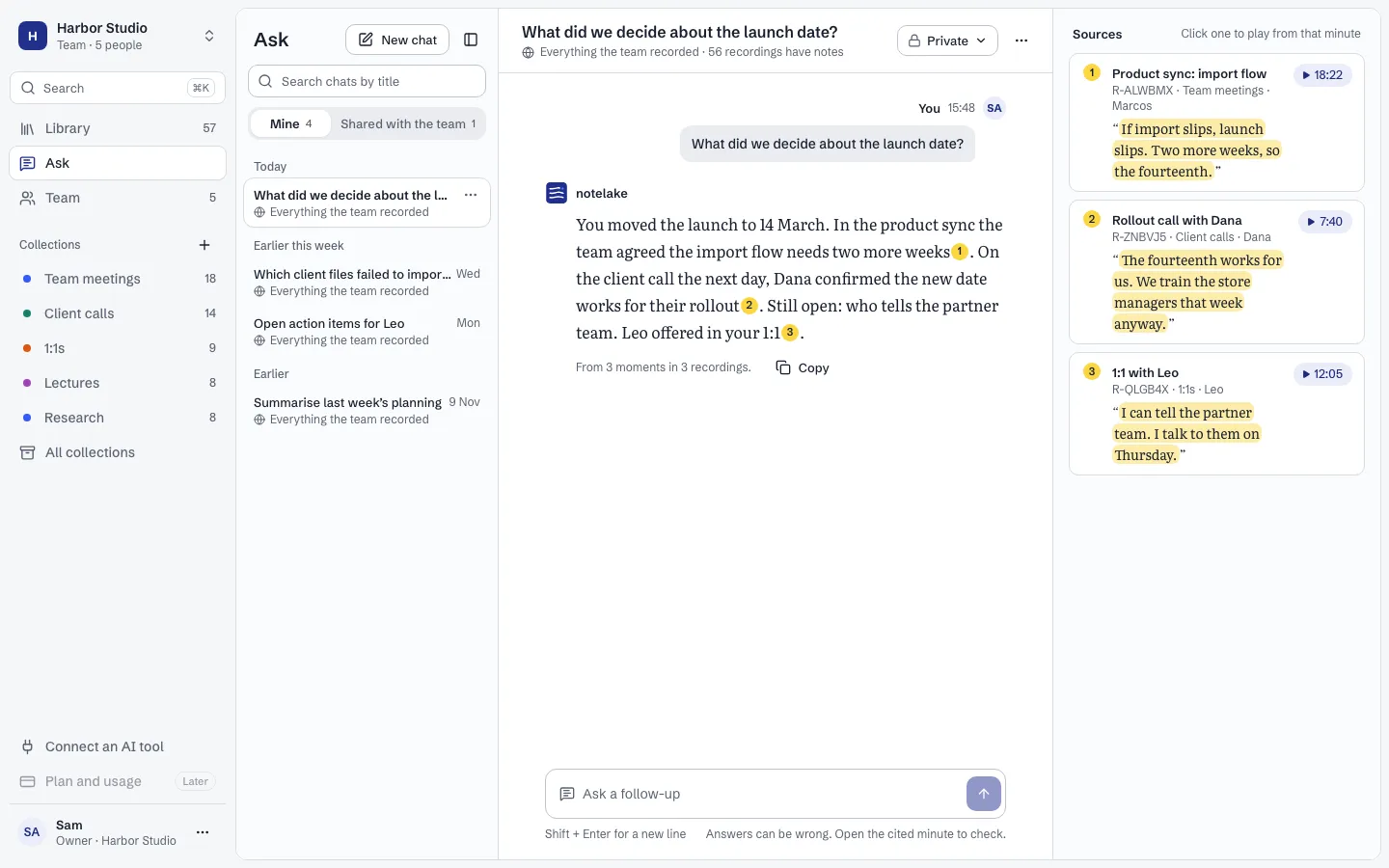
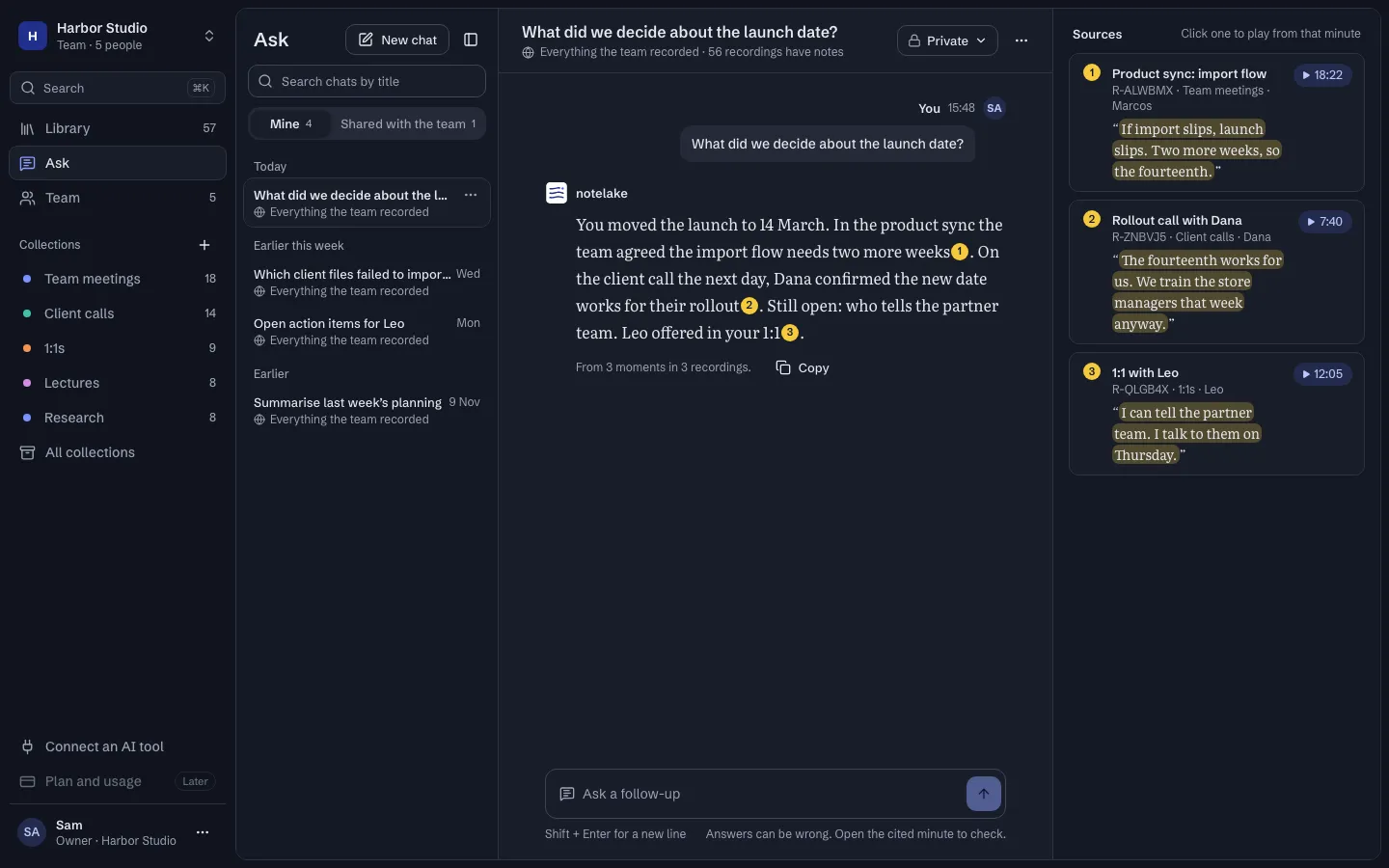
You moved the launch to 14 March. In the product sync the team agreed the import flow needs two more weeks1. On the client call the next day, Dana confirmed the new date works for their rollout2. Still open: who tells the partner team. Leo offered in your 1:13.
- 1Product sync: import flow18:22Team meetings, shared with the team
If import slips, launch slips. Two more weeks, so the fourteenth.
- 2Rollout call with Dana07:40Client calls, shared with the team
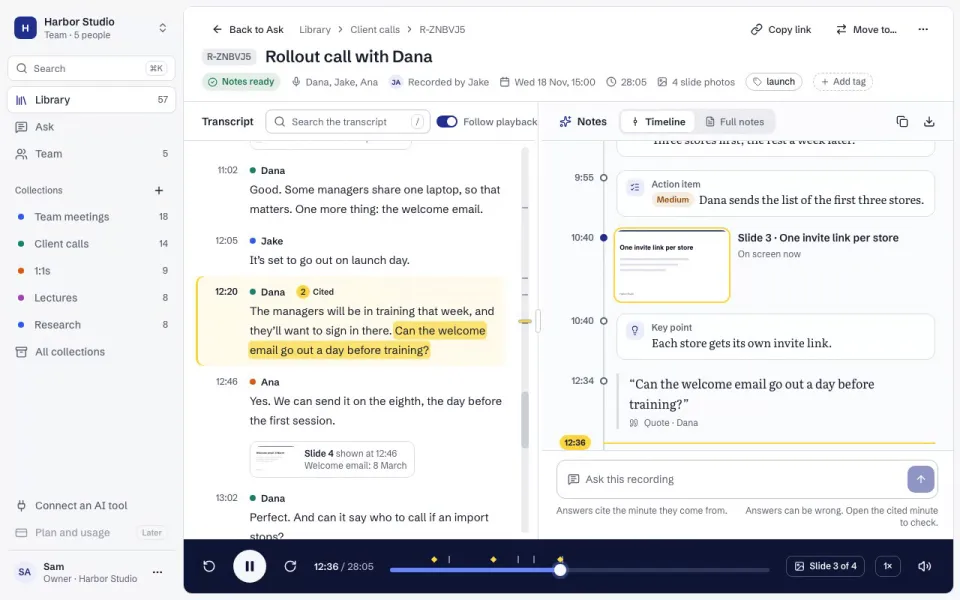
The fourteenth works for us. We train the store managers that week anyway.
- 31:1 with Leo12:05Private, only you
I can tell the partner team. I talk to them on Thursday.
How it works
Get a recording in from your phone or from the web. From there, both go the same way.
-
Bring your recordings in
Two ways in, one lake.
Using the phone app
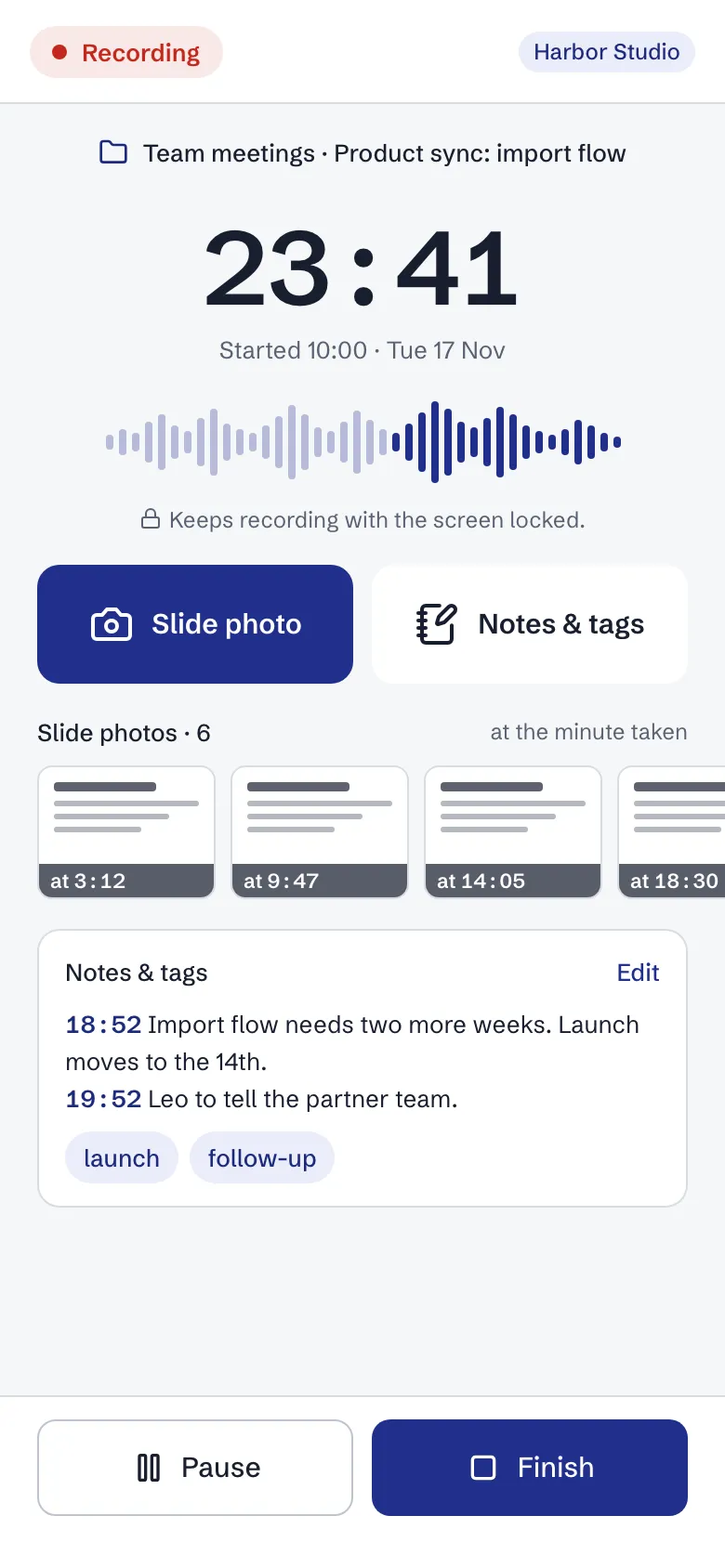
- Record live, even with the screen locked.
- No signal? It keeps recording and uploads later.
- Snap slide photos: each one is pinned to its minute.
- Add notes and tags as you go.
Using the web dashboard
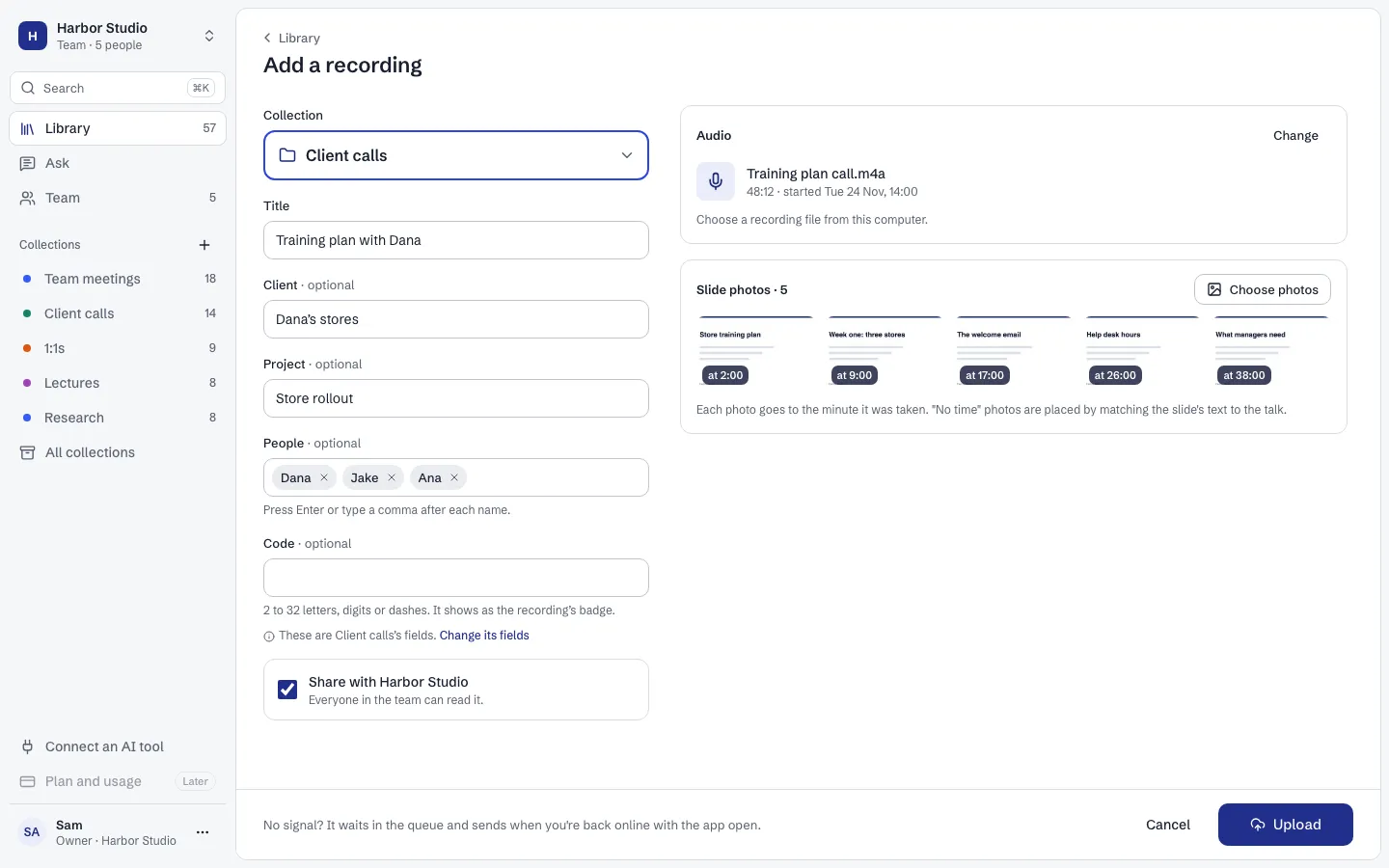
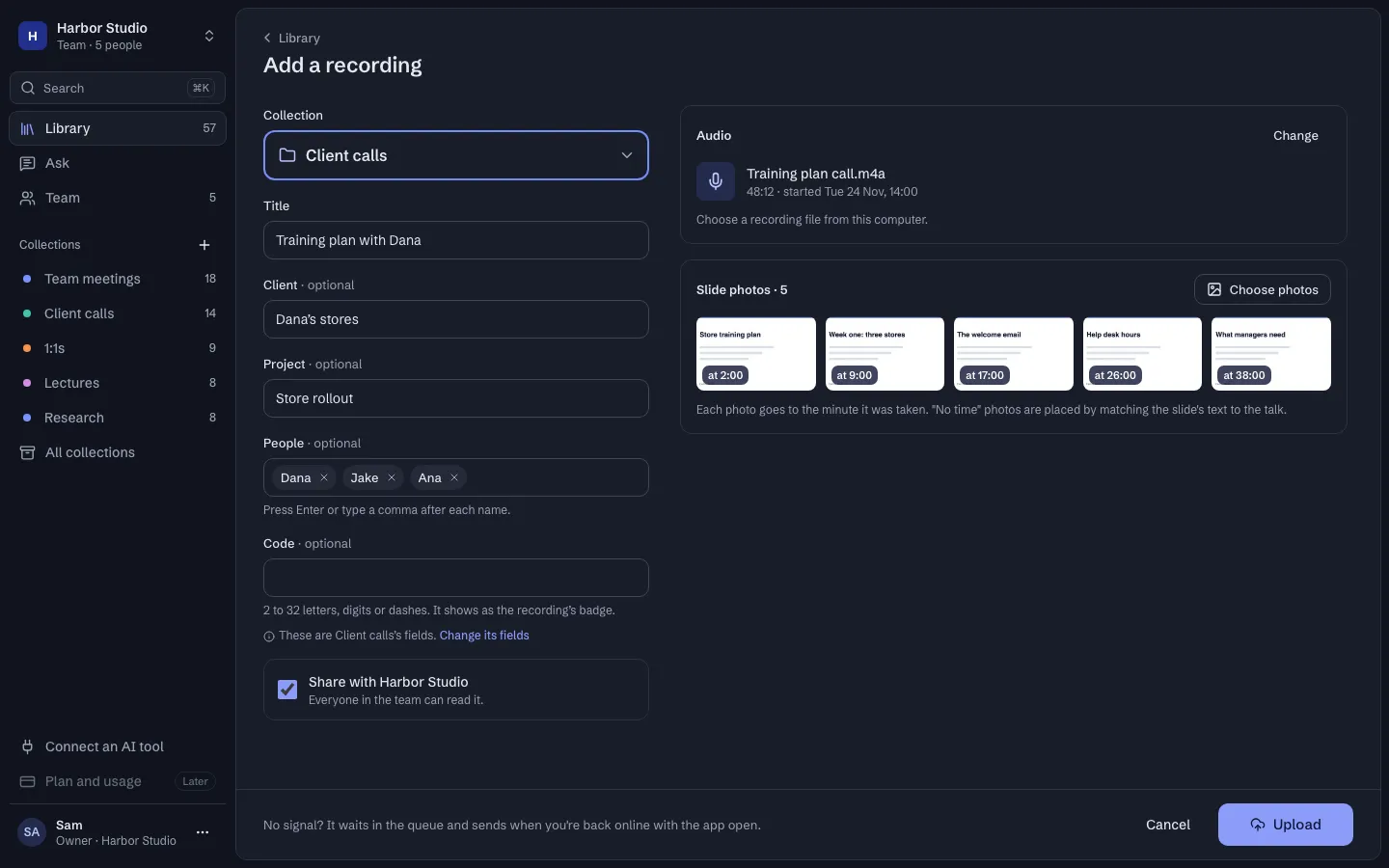
- Upload a recording: m4a, mp3, wav, aac or mp4, up to 500 MB.
- Add its slide photos: JPEG, HEIC or PNG.
- Each photo goes to the minute it was taken, or is placed by its text.
- notelake processes it the same way.
Coming later Recordings straight from meeting tools, such as Microsoft Teams and Google Meet.
-
The AI writes the notes
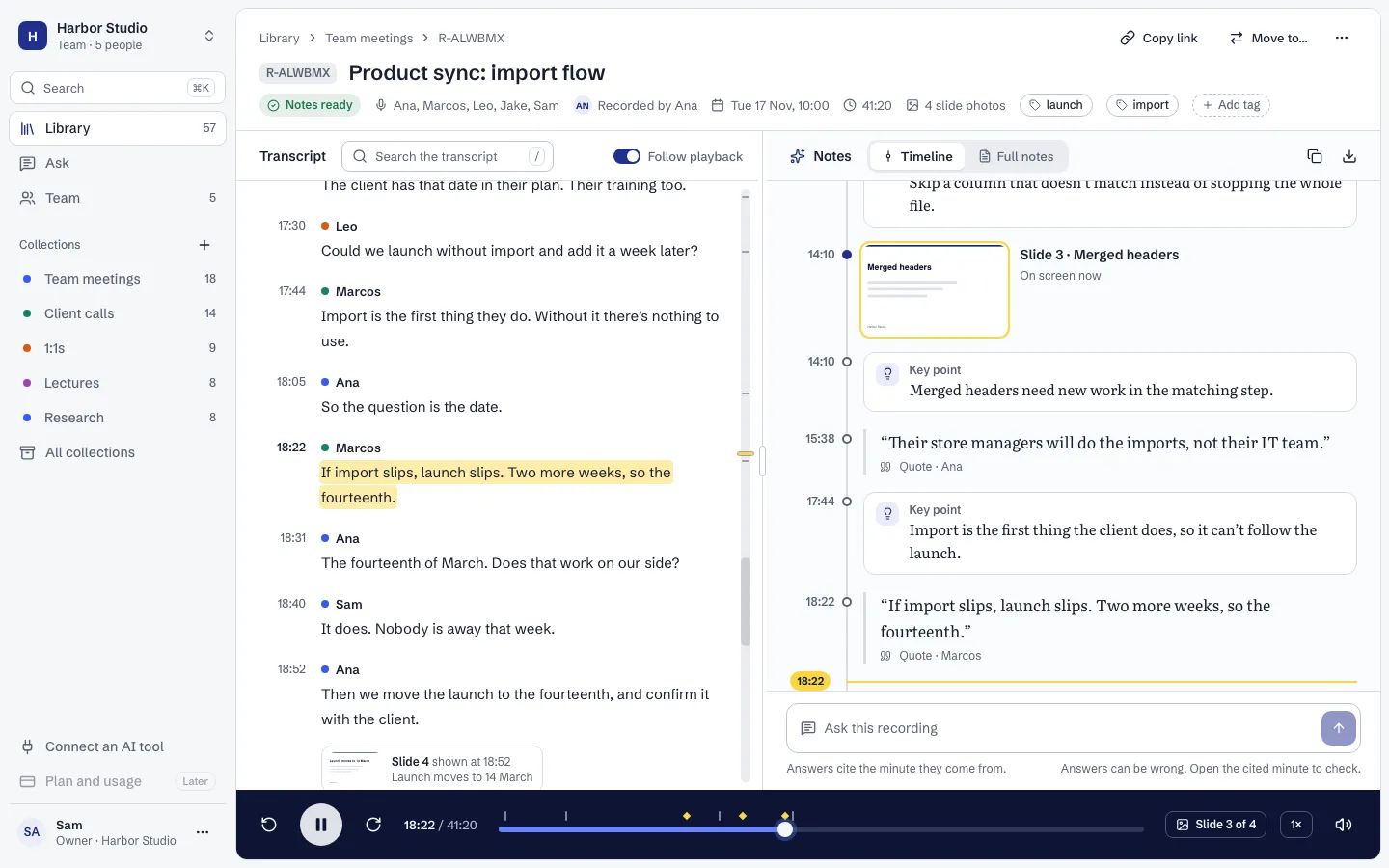
A transcript with speakers and slides, then a summary, key points, decisions, action items and quotes. Each one links to the minute it came from.
-
Your AI and Ask use them
Ask your own AI from wherever you work, or use Ask in notelake on the web and the phone. Either way, the answer names the recording and the minute.
Your data
Your recordings become data you own.
Every recording becomes four layers in a private lake: the audio and slide photos as you took them, a transcript, the AI’s notes, and an index of every sentence and slide.
It starts private to you. Share a recording and it joins your team’s lake. Export it, or delete it for good, whenever you like.
- Ana
- Jake
- Marcos
- You
Shared with the teamPrivate, only the person who recorded it
- Audio and slide photosKept as you recorded them. Export them whenever you like.
- TranscriptWho spoke and when, with each slide at the minute it was shown.
- AI notesSummary, key points, decisions, action items and quotes, each with its minute.
- Search indexEvery sentence and every slide, ready for your AI to find.
- Your own AIReads the lake as you. Read-only today.
- Ask in notelakeBuilt in, on the web and the phone.
Your AI
Your own AI reads it.
notelake speaks MCP, the open standard AI tools use to connect to data. Connect your lake once, then ask about any recording from wherever you already work with your AI.
- Connect it once, from Connect an AI tool in notelake.
- It signs in as you and sees only what you can see.
- Today it reads and searches, as you. Anything more will be opt-in.
- Disconnect it whenever you like.
Connects today
- Claude Works today
- Claude Code Works today
- Other MCP clients Coming soon
What did Dana ask us to change? Check notelake.
notelake · searched 57 recordings
Two things. Her team’s export should import as it is, without anyone cleaning it by hand1. And the welcome email should go out a day before the store managers’ training2.
- 1Rollout call with Dana 03:15
- 2Rollout call with Dana 12:20
Your company
One question across recordings, docs and tickets
Your AI may already read your docs, tickets and wiki. Add your lake, and one question reaches what was said too. Questions like these:
-
Compare what Dana asked for in Tuesday’s call with the rollout epic.
Two of her three asks are in the epic: take her team’s export as it is, and put the help desk number in the welcome email1. The third is missing. She wants that email a day before the managers’ training2, and the epic still sends it on launch day3.
- 1Rollout call with Dana03:15, From your lake
- 2Rollout call with Dana12:20, From your lake
- 3Store rollout epicYour tracker, From your other tools
-
Which conference talks contradict our caching design doc?
Two push back on it. One recommends short cache lifetimes with a background refresh1, where your doc picks long lifetimes and a purge on every write2. The other warns against keeping sessions in the same cache as product data3, which section 4 of your doc does.
- 1Caching at the edge21:05, From your lake
- 2Caching design docYour docs, From your other tools
- 3Sessions at scale14:40, From your lake
-
Summarise every interview that mentions onboarding, next to the product spec.
Six interviews mention onboarding. Four people got stuck at the import step1, which the spec marks as optional2. Two asked to invite their team during sign-up3; the spec leaves invites for later.
- 16 interviews in Research4 moments, From your lake
- 2Product spec: onboardingYour docs, From your other tools
- 3Interview with Priya12:30, From your lake
-
What did we promise on client calls this month that isn’t on the roadmap?
Three promises. A Friday report for Dana’s stores1, a CSV of the help desk log2, and the welcome email in Spanish2. The roadmap has none of them3.
- 1Weekly check-in with Dana08:15, From your lake
- 2Import test with Dana22:40, From your lake
- 3Q1 roadmapYour wiki, From your other tools
Examples. notelake gives your AI the recordings; the docs, tickets and wiki come from what your AI already connects to. Answers can be wrong, so each one names its sources.
Every kind of recording
Meetings
Which decisions from this week’s syncs aren’t on the roadmap yet?
Lectures and classes
Where does the lecture disagree with chapter 4 of the textbook?
Research sessions
Which problems people hit already have an open ticket?
1:1s
What did I promise to follow up on, and is it on my task list?
Voice memos
Which ideas from my walks are already in the backlog?
Yours
Your data stays yours.
The rules are short, and they are the same on the phone, on the web and for any AI you connect.
- Private by default
- A recording is yours alone until you share it.
- Team sharing
- Only the recordings you choose to share. Your team never sees your private ones.
- What your AI can do
- Today it reads and searches, as you, and only what you can see. Anything more will be opt-in.
- Trusting an answer
- Answers can be wrong. Each one cites its minutes so you can check.
- Delete means delete
- Delete a recording and its audio, photos, transcript and notes are removed for good.
- Taking your data out
- Export the audio, the slide photos and the notes. They are yours.
- Crash reports
- When the app fails, it tells Sentry where, never what you recorded or wrote.
See it work
These are the real screens, filled with a demo team’s recordings. Nothing here is a mock-up.
-
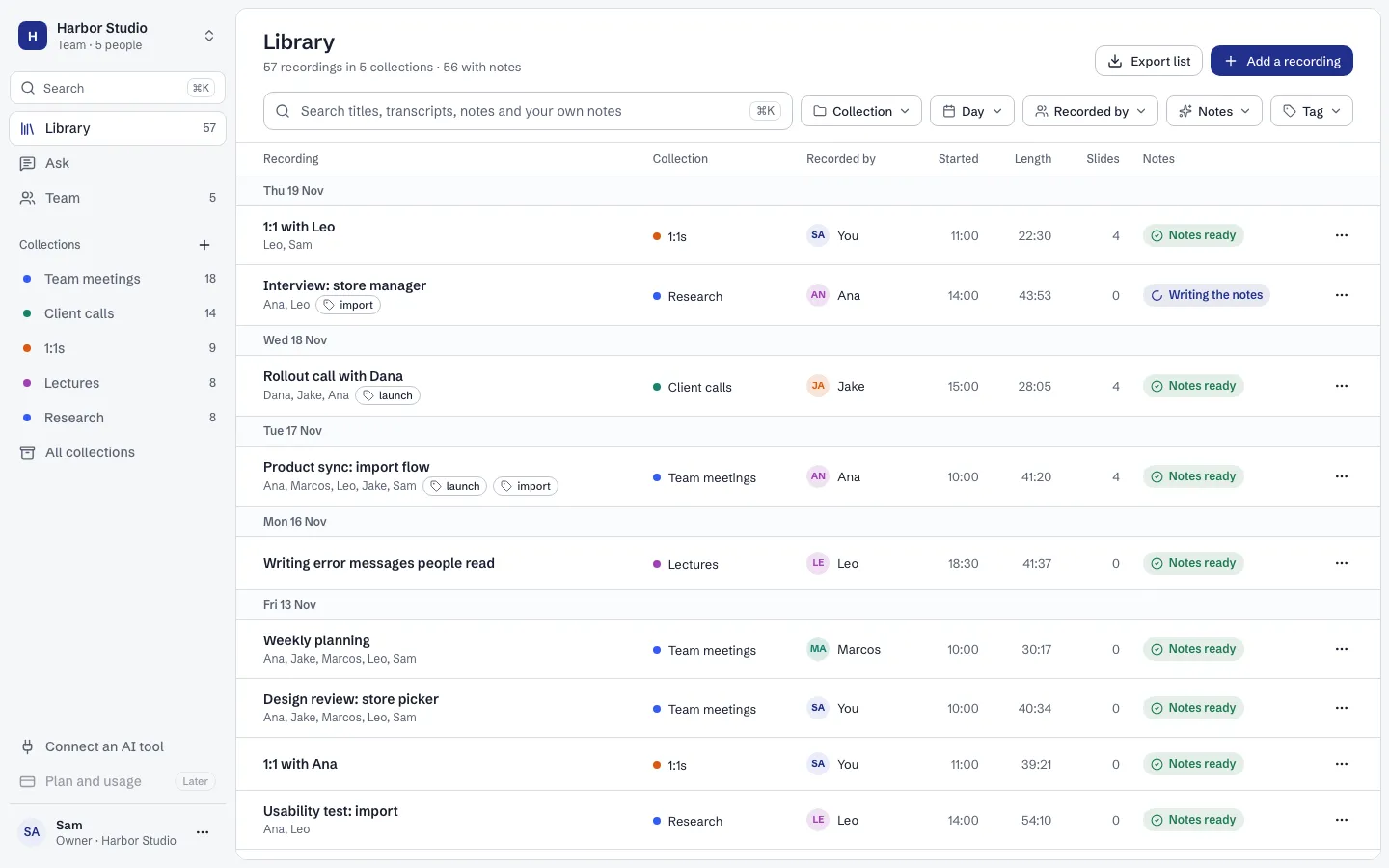
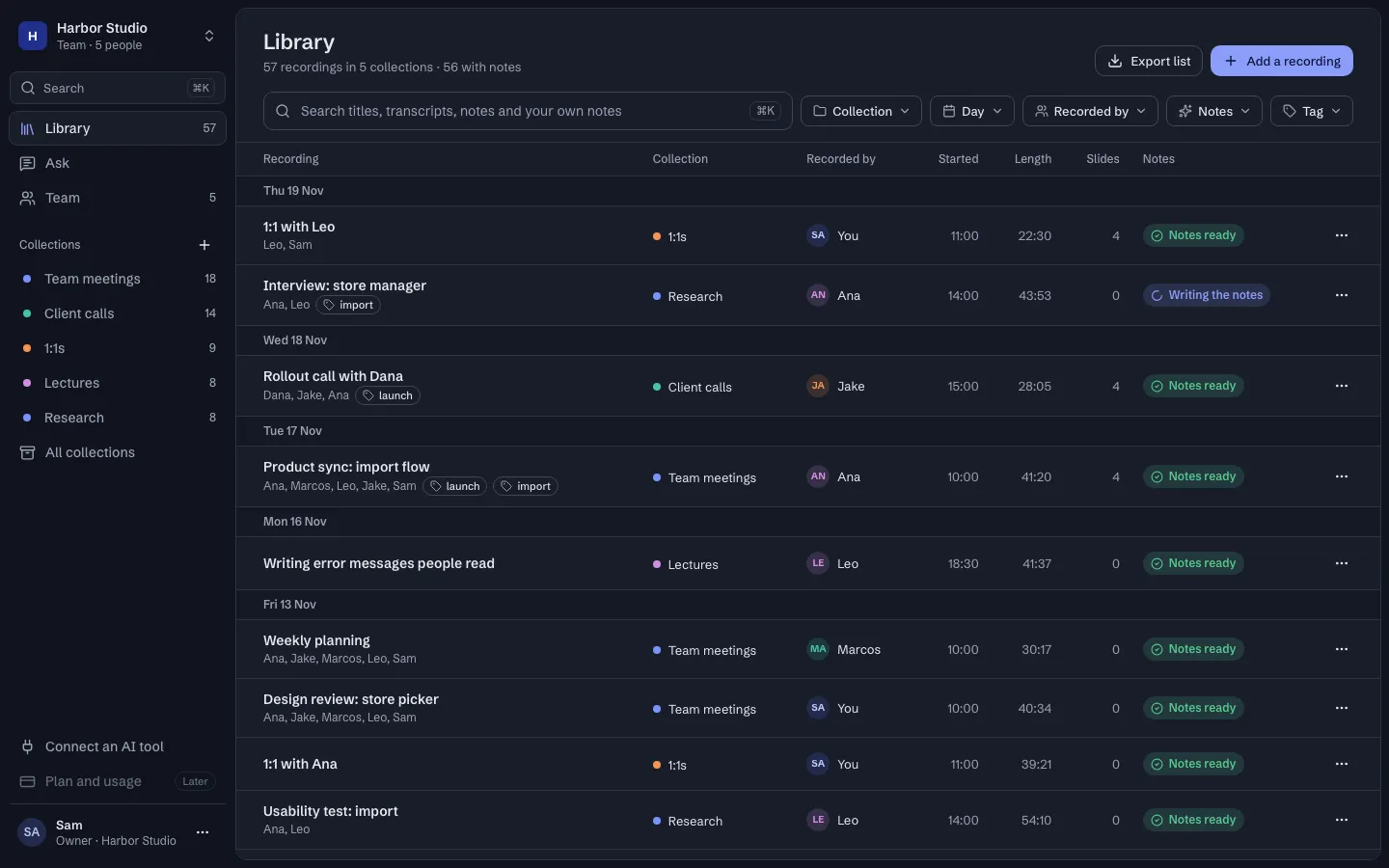
Library
Every recording in one list. Filter by collection, day, person or tag, and search titles, transcripts and notes.
-
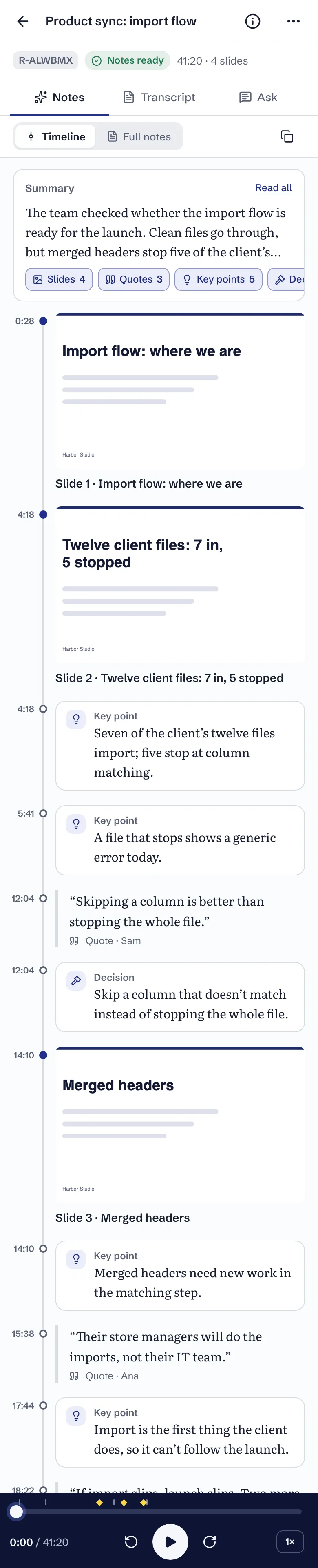
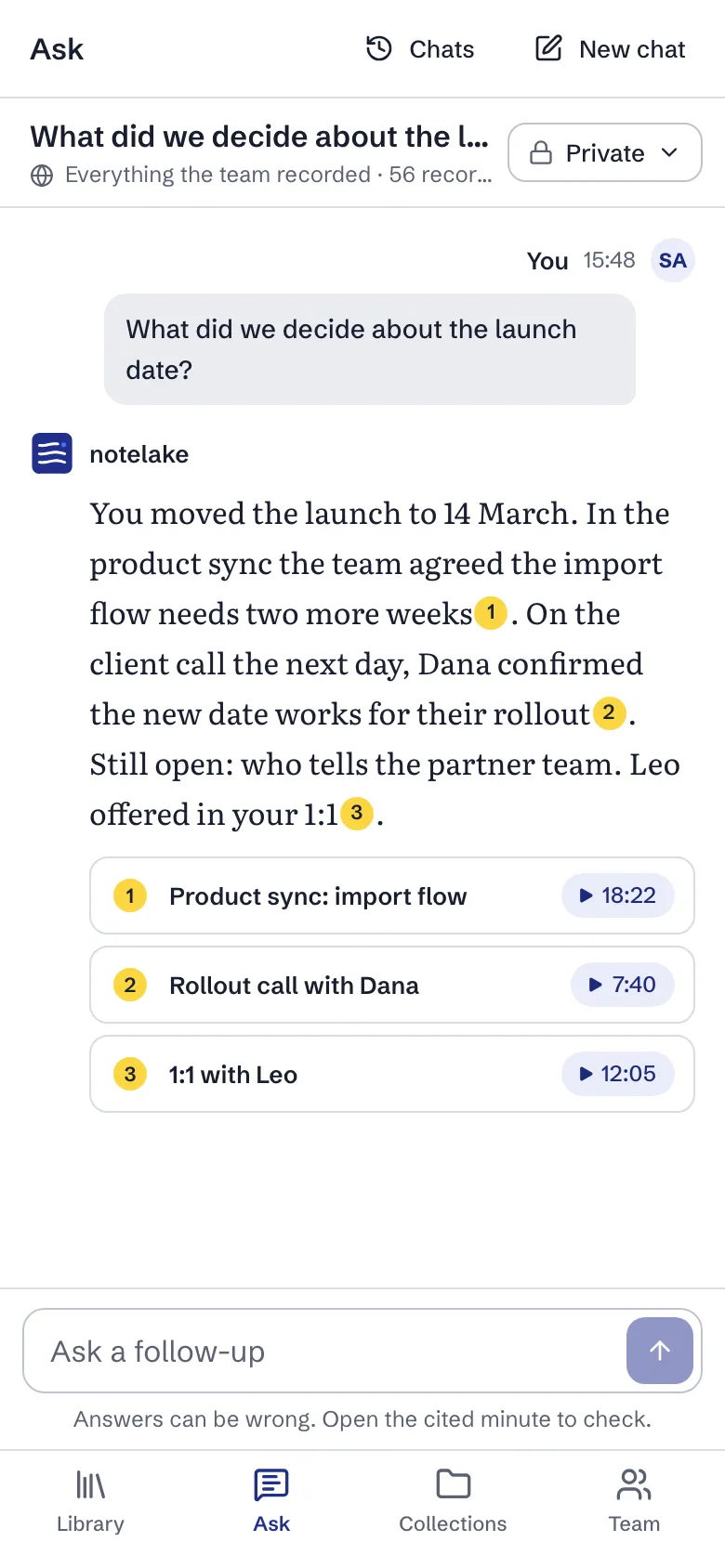
On the phone
Record, read the notes and ask, from the same app. It keeps recording with the screen locked.
-
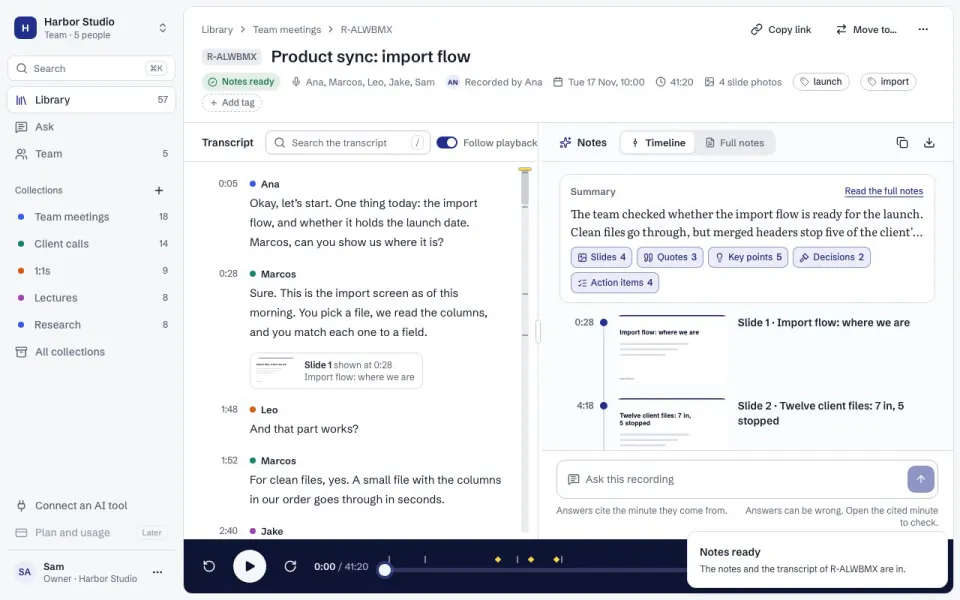
Recording workspace
Transcript, timeline and player move together. Click any line, slide or key point to hear it. Add your own timed notes and tags.
-
Ask, built in
No AI tool at hand? Ask one recording, a collection or everything, right in notelake. Chats are saved.
-
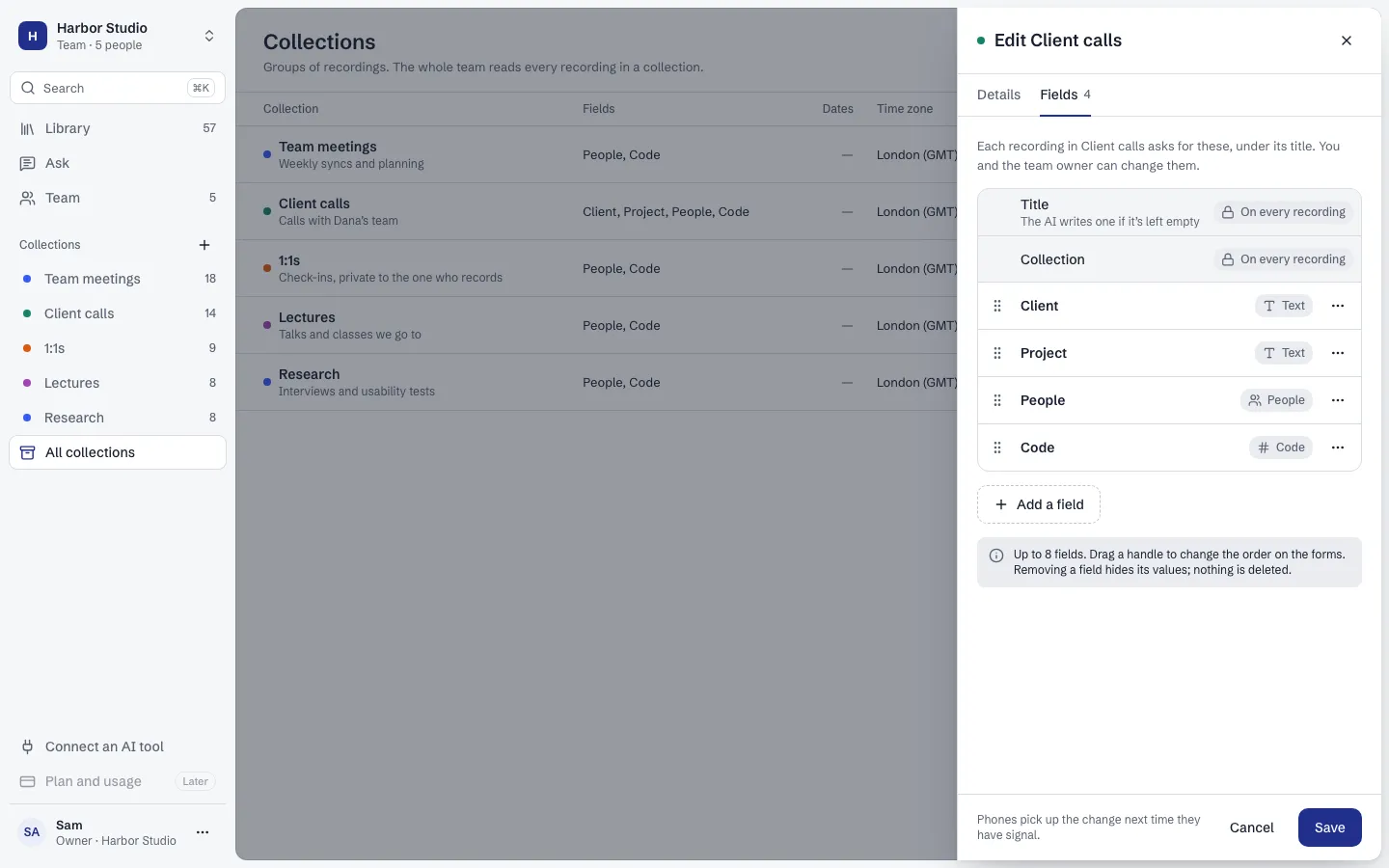
Collections with your own fields
Group recordings your way: a client, a course, an event. Give each collection the fields it needs.
Short videos
Each one opens in a player, with captions on.
-
 Captions
The notes appear
A recording goes from Writing the notes to Notes ready, and the timeline fills in.
-
 Captions
Ask, then jump to the minute
One question across every recording. A click on a source plays that recording from its minute.
Questions
Which AI tools can read my lake?
The ones marked “Works today” under “Your own AI reads it”. Other AI tools that speak MCP, the open standard for connecting AI tools to data, are coming soon.
Does notelake connect to my docs and tickets?
No, your AI does. notelake gives your AI the recordings. Your AI’s other connections give it your docs, tickets and wiki, and it reads both to answer.
Can my AI change or delete my recordings?
Not today. Today it reads and searches your lake, signed in as you. Anything more will be opt-in.
Is notelake only for conference talks?
No. It began there, and it now takes any recording: meetings, client calls, interviews, lectures, research sessions, 1:1s and voice memos.
How do I get in?
notelake is invite-only. Leave your email below and we will send an invite when there is a place.
What does it cost?
It is free during the invite-only period. Paid plans will come later, and we have not set prices yet.
Can I record without a connection?
Yes. The phone app records offline, keeps the recording on the phone and uploads it when you are back online.
Does it join my Zoom or Teams call?
Not yet. Today you record on the phone or upload the call’s recording on the web. Recordings straight from meeting tools, such as Microsoft Teams and Google Meet, come later.
Are the answers always right?
No. AI can get things wrong. That is why every answer cites the minute it came from, so you can check.
Can I delete my recordings or take them elsewhere?
Yes to both. Delete removes a recording for good. Export gives you the audio, the slide photos and the notes.
Start your lake with the next thing you record.
Leave your email and we will write when your invite is ready.
We use your email only to send the invite, and keep your request for up to 12 months. Paid plans come later; no prices yet.